

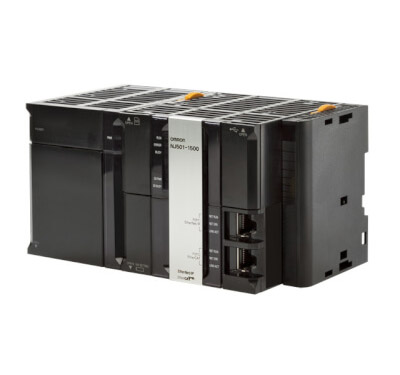
Omron NJ1 PLC

The Sysmac NJ1 Machine Controller is a logic and motion control controller designed for compact machines.
  • Minimum cycle time: 1 ms
  • Number of axles: 2
  • Synchronous Task for Motion Core: 1
  • Functions: logic, motion and database connection
  • Multitasking
  • Integrated EtherCAT and EtherNet / IP ports
  • DB connection: SQL client for Microsoft SQL Server, Oracle, IBM DB2, MySQL, Firebird
Request a free quote

Choose the size, quantity and add to the quote

Product price
Additional options total:
Order total:
Product details
Omron NJ1 PLC

Omron NJ1 PLCs are part of the Omron NJ family which consists of scalable programmable controllers for logic sequence control and motion control that include options for advanced functions such as robot control and connection to SQL, Oracle, MySQL, IBM DB2, Firebird databases etc. The Omron NJ family is able to control up to 64 axes with logic sequence, motion, robot (Delta, SCARA and Cartesian control) functions. The Omron NJ1 PLC is able to control 2 axes with PLC logic, motion and database connection functions.


Omron NJ1 PLC and Sysmac platform

The Sysmac automation platform of which the Omron NJ1 PLC is a part provides an integrated solution including the best in machine controllers that work seamlessly with the best devices in the field via the fastest network of machines on the market (EtherCAT). The Sysmac automation platform is programmed, configured and simulated by a single software (Sysmac Studio) and can be accessed through a single connection (Ethernet / IP).
The heart of Sysmac is the Machine Controller series, which offers synchronous control of all machine devices and advanced features for motion, robotics and database connectivity. This multidisciplinary concept allows you to simplify the architecture, reduce programming and optimize productivity.


Integrated developement environment

One software with an integrated development environment for configuration, programming, simulation and monitoring.


Omron NJ1 PLC – four models

The Omron NJ1 PLC is produced in 4 models: the basic model is the NJ101-9000 CPU which allows only logic programming. Motion control can be performed with the NJ101-1000 and NJ101-9020 PLC. The latter also allows connection to SQL databases. The most sophisticated NJ1 model is the Omron NJ101-1020 PLC which in addition to motion and database connection also allows the control of two axes.

NJ series CPU units

Symbol

CPU

Program capacity

Variables capacity

Specifications

Functionalities

Number of axes

Order code

Sequence

Motion

DB connection

Robotics

SECS/GEM

NJ501

20 MB

2 MB: Retained

4 MB: Not retained

I/O capacity: 2,560 points

CPU rack: 10 units max.

Expansion rack:
10 units max.

(Up to 3 expansion racks)

40 units max. per system (CPU rack + 3 expansion racks)

Current consumption:

1.90 A at 5 VDC

64

NJ501-1520

32

NJ501-1420

16

NJ501-1320

16

NJ501-4320

64

NJ501-4500

32

NJ501-4400

16

NJ501-4300

16

NJ501-4310

16

NJ501-1340

64

NJ501-1500

32

NJ501-1400

16

NJ501-1300

NJ301

5 MB

0.5 MB: Retained

2 MB: Not retained

8

NJ301-1200

4

NJ301-1100

NJ101

3 MB

2

NJ101-1020

0

NJ101-9020

2

NJ101-1000

0

NJ101-9000

Note: The end cover unit CJ1W-TER01 is included with the CPU unit.

Sysmac Studio

Sysmac Studio software offers a design and operating environment for configuration, programming, simulation and monitoring. Sysmac Studio was created to offer machine developers complete control from a single environment. Sysmac Studio integrates configuration, programming, simulation and platform monitoring into a single intuitive and consistent user interface. Sysmac Studio is the only software required for creating an application with the Sysmac platform: from the NJ series controller, which combines logic and motion control, to vision systems and Safety.


Compliance with the best known standards

Fully compliant with IEC 61131-3 open standards, Sysmac Studio offers a state-of-the-art programming environment based on ladder diagrams, structured text programming languages ​​and program organization units that include programs, functions and function blocks. In addition, motor control instructions based on PLC open standards and an IEC compliant instruction set are included. Offering a familiar programming environment virtually eliminates the time it takes to learn new software, allowing for quick use.


Programming with variables

It is not necessary to know the NJ controller’s internal memory map. Sysmac Studio automatically allocates available memory in the CPU unit to variables created to promote faster development and reduce errors. This also eliminates the waiting time for the hardware definition of memory addresses before starting software development. Hardware and software can therefore be designed independently and developed in parallel.


Ease of use

Sysmac Studio has minimized restrictions on design procedures to allow project building to begin from anywhere in the system. The configuration is characterized by intuitive operating procedures with perfectly adapted guides that do not interfere in any way with the workflow. This ensures extremely easy operation which allows for flexible design work where even errors in settings and procedures can be corrected immediately or later upon finalization of the project, provided they do not cause serious accidents.


Full debugging

Sysmac Studio offers comprehensive functions for debugging sequence control, such as changing actual values ​​and online programming. It also provides debugging functions with motion control simulations, such as displaying results in 2D or 3D and displaying traces on virtual devices. The new 3D Simulation tool gives the programmer the ability to see the physical motion and sequence of the machine as direct results of the implemented code and configuration.

To accurately simulate motion control, Sysmac Studio provides instructions for creating virtual external signals such as positive / negative limit switches, home position proximity signal, immediate stop input signals and external latch. Motion alert and alarm instructions can also be implemented as additional fault recovery control measures. The included data trace function also offers a high level of detail and allows the display of a time diagram in parallel with the path markers in 2D or 3D. The simulation results are recorded in a data trace file, to allow for a more accurate analysis of performance and to ensure proper operation. The combination of 3D motion simulation with the CPU emulation program provides the programmer with utilities to evaluate the correct sequence, optimal path control, minimum execution time and other critical operations. As a result, the distance between machine design and operation is drastically reduced in this way.


Maximum safety

Advanced investment and machine protection features are provided as standard in Sysmac Studio. The prevention of incorrect connections and operations or improper acquisition of programs and functions are essential elements in the realization of small and large projects. Functions such as confirming controller names and serial IDs, administrator access rights, and controller write protection protect the machine when authenticating user program execution and having a password to access control files. project protect development intellectual property. Your system will always be safe thanks to the 32-digit password protection.


Task control

Task management, a function common to the NJ series controller and Sysmac Studio, ensures the planned operation of the control system. The Task System used by NJ-series controllers allows you to assign a condition and order of execution to a variety of processes, such as updating I / O and executing user programs. This new level of control allows the programmer to select how the CPU should operate during runtime to ensure consistently fast operation throughout the life of the machine. Sysmac Studio offers powerful performance evaluation tools and simple and clear adjustments for configuring tasks. Only valid options are displayed for a task selection, providing the user with practical guidance on correct configuration. Once the configuration is chosen, the timing of the schedule can be monitored to ensure optimal operation. Task Execution Time Monitor can be used with Simulator to view execution times before downloading to physical controller. These new software “tools” allow the user to predict machine operation prior to implementation rather than face unexpected situations during commissioning.